Inviting a tenant administrator
Invite Admin emails one person a link to create their account in a tenant. It is how you hand a new tenant over to its own people. You can also send the first invitation while creating the tenant, from the Invite Admin block of the Add New Tenant drawer.
- Access to Tenants in the staff console.
- A tenant that is not Offboarding or Deleted. On those two, Invite Admin is hidden.
If an area or a button is missing, your staff role does not include it. Ask a platform administrator to extend your access.
Steps
Open the tenant’s invitations
Open the tenant from Tenants, then select Invitations in the Settings rail.
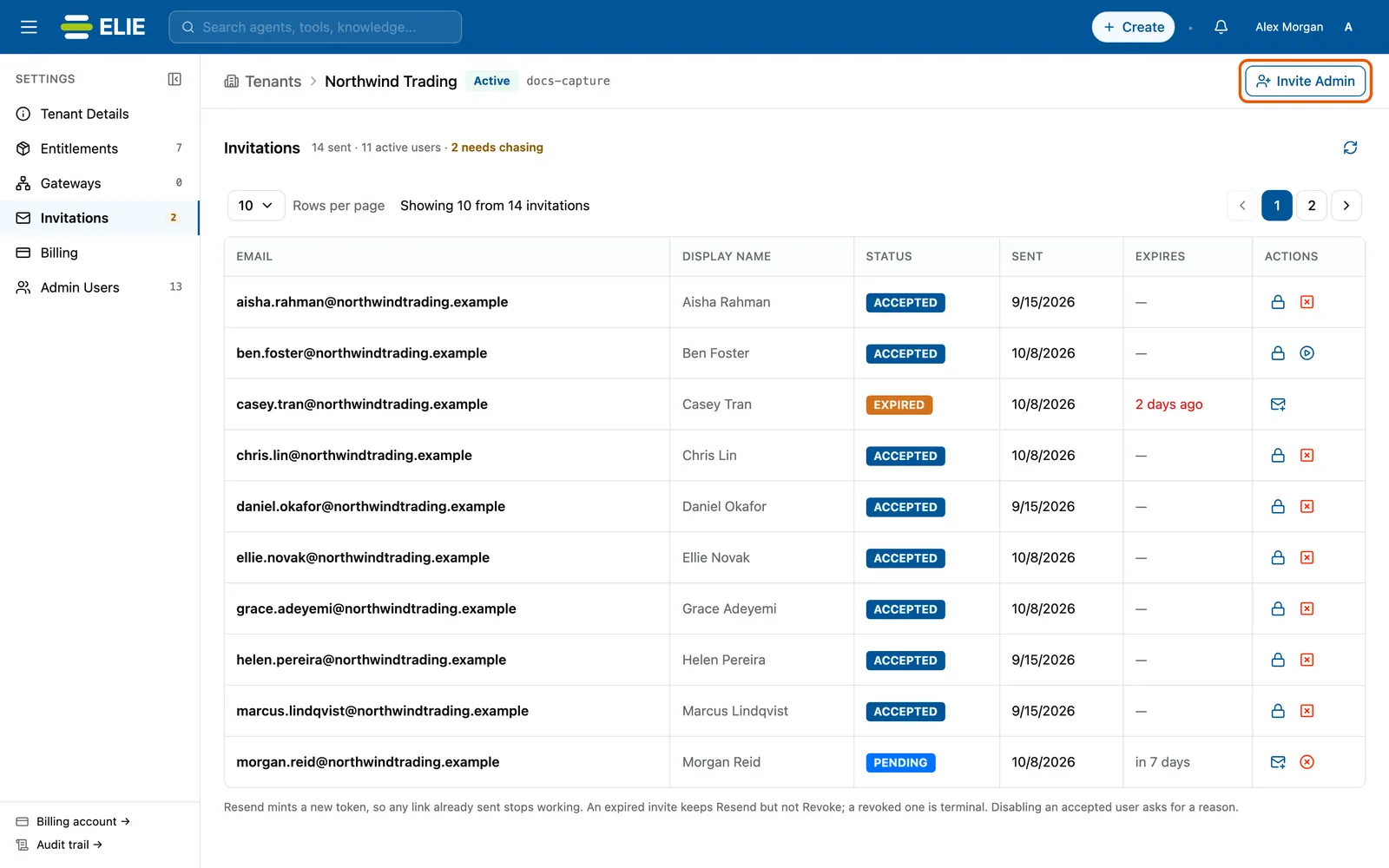
Northwind Trading's Invitations section: a line counting invitations sent, active users and those needing chasing, then each invitation's email, display name, status, sent date and expiry, with Invite Admin ringed at the top right. EnlargeOpen the drawer
Select Invite Admin. The drawer is titled Invite Admin to followed by the tenant’s name.
Say who you are inviting
Fill in Email and Display Name. Both are required, and Send Invitation stays greyed out until both are valid.
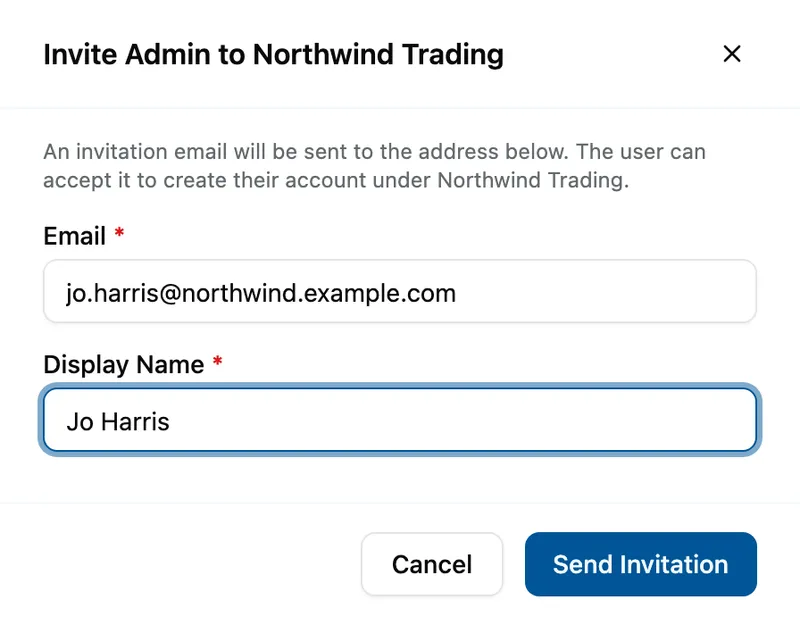
The Invite Admin to Northwind Trading drawer with Email jo.harris@northwind.example.com and Display Name Jo Harris, above Cancel and Send Invitation. Send it
Select Send Invitation. It reads Saving… briefly. Cancel discards what you typed.


What success looks like
- Invitation sent successfully! appears and the drawer closes.
- A new row reads PENDING, and EXPIRES reads in 7 days: an invitation lasts seven days.
- The person gets an email whose link lets them create their account.
Following up
The line under Invitations counts what was sent, how many people are now active users, and how many invitations still need chasing. That last count also shows in amber on the rail.
| Status | What it means | What you can do |
|---|---|---|
| PENDING | Sent and not used yet. | Resend or Revoke. |
| EXPIRED | Seven days passed without it being used. | Resend only. |
| REVOKED | Withdrawn. It cannot be used or revived. | Send a new invitation. |
| ACCEPTED | The person created their account. | Manage the person, see A tenant's people and their access. |
Resend issues a fresh link and restarts the seven days, so any link already sent stops working. Revoke asks you to confirm in Revoke Invitation, after which the link stops working too.
If something goes wrong
| Symptom | Likely cause | What to do |
|---|---|---|
| No Invite Admin button. | You are on another section, or the tenant is Offboarding or Deleted. | Select Invitations in the rail; read-only tenants cannot invite. |
| Send Invitation stays greyed out. | Email or Display Name is empty or invalid. | Fix the field named in the red message, such as Enter a valid email address. |
| A user with this email address already exists in this tenant. | The person already has an account here. | Nothing to send. Check Admin Users. |
| This email address is not available. Please use a different address. | The address belongs to a user in another tenant. An address can belong to one tenant only. | Ask for a different address. |
| The person never received the email. | A typo, or the mail went astray. | Check the address in the row, then Resend, or revoke and invite the right address. |
Next
- A tenant's people and their access - after they accept.
- Accepting an invitation - what the recipient does.
- Finding and creating a tenant - reopening a tenant.