Finding and creating a tenant
The Tenants list is where every organisation on the platform starts and ends. Use it to find a tenant, add a new one, and open its page.
- Access to Tenants in the staff console.
- A staff sign-in. Tenant management needs no extra staff permission.
If an area or a button is missing, your staff role does not include it. Ask a platform administrator to extend your access.
The tenant list
Open Tenants from the Available Apps panel (the menu button at the far left of the header), or select a figure on Platform overview. The line under the title reads, for example, 12 active of 15 · 2 provisioned in the last 30 days.
| Column | What it holds |
|---|---|
| TENANT | The name, which opens the tenant. Under it: the subdomain (or slug not set), the plan and how many months it has been live. |
| STATUS | Active Suspended Offboarding Deleted |
| BILLING | The worst thing true of its billing: No account, Suspended, Charge held, Overdue, In debt or Healthy. |
| MTD SPEND | Credits charged this month, or a dash with no billing account. |
| ENTITLEMENTS | Components granted out of the components the platform has, such as 5/7. |

The list opens on Active tenants only, shown as a Status: Active chip; select Clear all
to see every status. Filters narrows by Status, Plan, Setup gaps (No slug
claimed, No gateway) and Created, each with an estate-wide count. Billing state is
greyed out: the tenant list cannot filter on it, so work by billing state from the
billing queues. Search by name matches names, and
Export downloads every tenant the current filters match as tenants.csv.

Steps
Open the drawer
Select Add Tenant on the list, or Create and then Add New Tenant in the header. The Add New Tenant drawer opens.
Name the tenant
Enter Tenant Name and Primary Contact Email, and pick a Plan: Starter (pre-selected), Growth or Enterprise. Subdomain is optional, but it is needed before the tenant can have a gateway and it can never be changed once set.
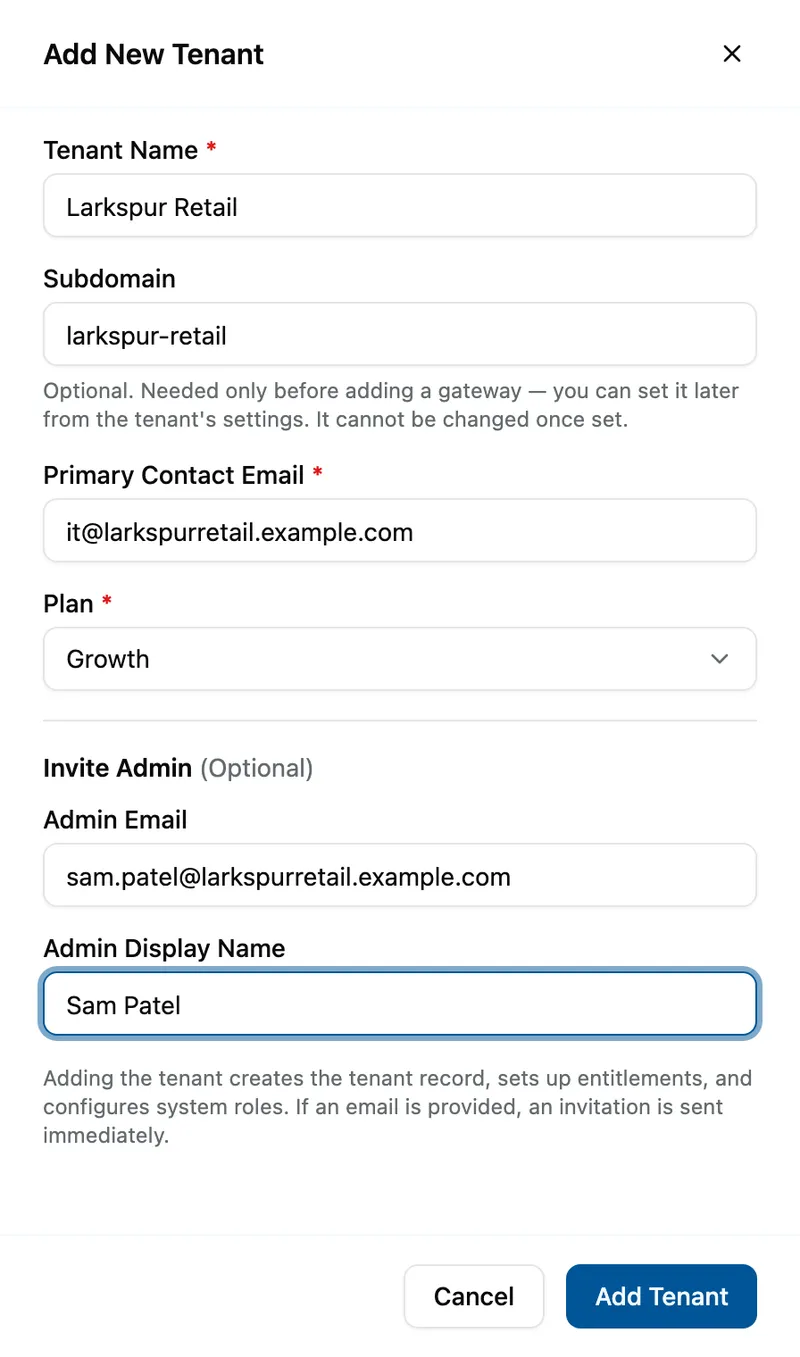
The Add New Tenant drawer filled in for Larkspur Retail: subdomain larkspur-retail, contact it@larkspurretail.example.com, plan Growth, and under Invite Admin the admin Sam Patel, sam.patel@larkspurretail.example.com. Optionally invite an admin
Under Invite Admin, add an Admin Email. Admin Display Name unlocks then, and is required once it does.
Add it
Select Add Tenant. It stays greyed out until the form is valid and reads Saving… while it runs.

What success looks like
- Tenant added successfully! appears, with Invitation sent successfully! if you gave an admin email, and the drawer closes.
- The tenant has its record, its starting entitlements and its system roles, and billing opens an account for it with no credit.
Inside a tenant
Selecting a name opens the tenant's page. Its Settings rail lists six sections, with counts where there is work: Tenant Details, Entitlements, Gateways, Invitations, Billing and Admin Users. Tenant Details shows the credit balance, month-to-date spend, entitlements and sign-in method, then the record itself, where you can Edit Basic Details or set a missing subdomain with Set subdomain. Two links at the foot of the rail, Billing account and Audit trail, open this tenant in those apps.

If something goes wrong
| Symptom | Likely cause | What to do |
|---|---|---|
| Add Tenant stays greyed out. | A required field is empty or invalid, or there is an Admin Email with no Admin Display Name. | Fill the field, or clear the admin email. |
| Tenant name can only contain letters, numbers, spaces and & . , ' - characters. | A character the name does not accept. | Remove it. Names also stop at 100 characters. |
| A user with this email address already exists in this tenant. or This email address is not available. Please use a different address. | The admin email already belongs to a user, here or in another tenant. | Use a different address. |
| A tenant you expect is missing. | The list shows Active tenants unless you change the filter. | Select Clear all, or pick the status under Filters. |
| BILLING and MTD SPEND are blank on every row. | The billing service is unreachable. | Try again in a few minutes; see Billing in the staff console. |
Next
- Inviting a tenant administrator - if you skipped the admin.
- Granting a tenant an entitlement - what the tenant may use.
- A tenant's billing and API limits - set up billing and credit.