Changing a tenant's enforcement mode
A tenant's enforcement mode decides whether billing records its usage, charges for it, or charges and refuses paid work once the credit runs out. A change takes effect at once.
- Access to Billing in the staff console.
- These permissions: billing.tenant.read, billing.settings.manage.
- A tenant with a billing account.
If an area or a button is missing, your staff role does not include it. Ask a platform administrator to extend your access.
Steps
Open Enforcement
Open the tenant under Billing, then Tenants, and select Enforcement in the rail, or Change enforcement on its summary.
Check where it stands
Current mode shows the mode, who set it and why under Set by, and the Service state, Balance and Grace deadline.
Pick the new mode
Under Change the mode, pick one of the options; each spells out its consequence. The mode already in force is marked as current and cannot be picked.
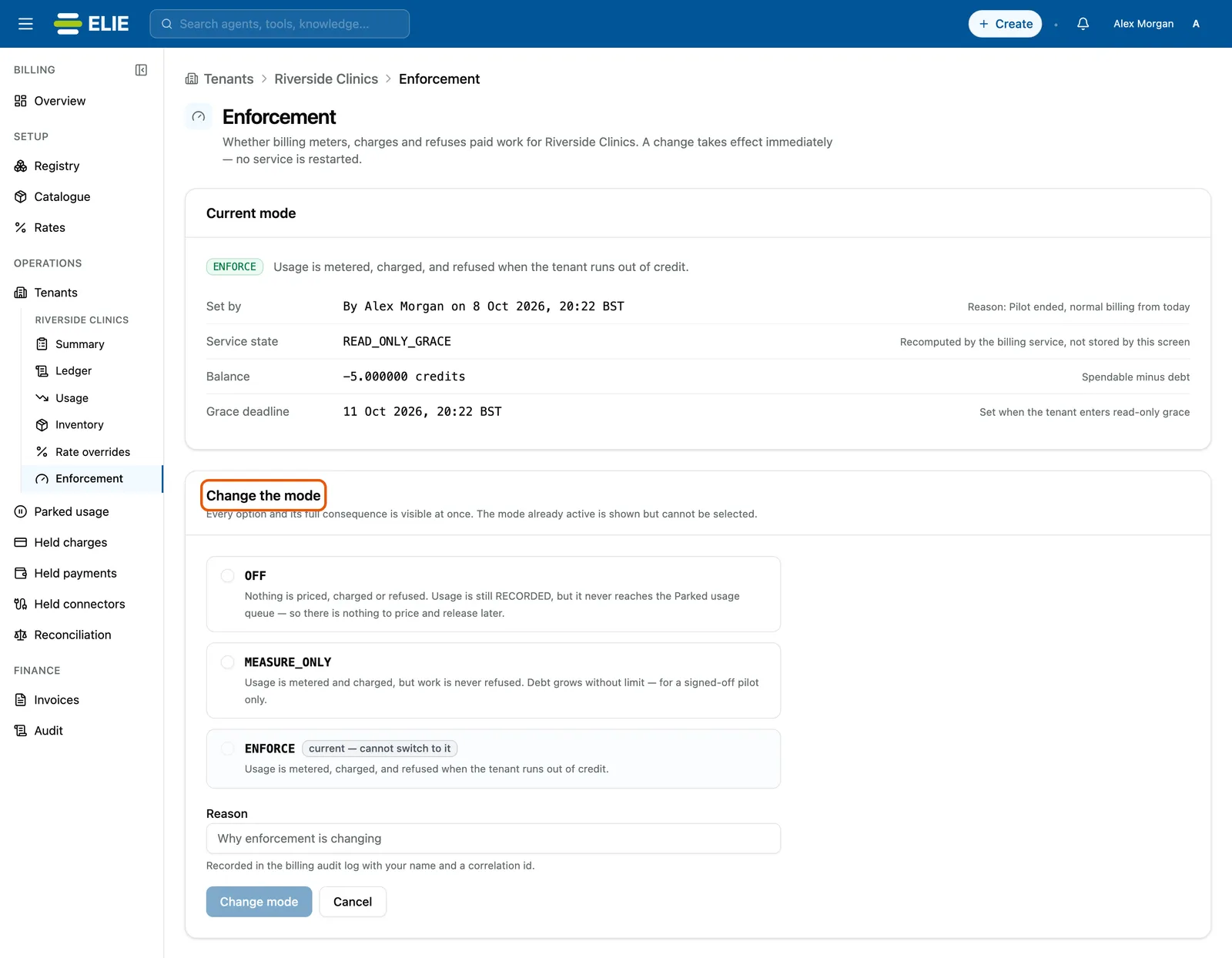
Riverside Clinics' Enforcement screen: Current mode ENFORCE, set by Alex Morgan with the reason Pilot ended, normal billing from today, service state READ_ONLY_GRACE, balance -5 credits and a grace deadline; below it Change the mode is ringed, offering OFF and MEASURE_ONLY with ENFORCE marked current. EnlargeGive a reason
Type a Reason and select Change mode. A drawer restates the change and predicts the tenant’s state afterwards.
Confirm
When switching to
ENFORCE, typeENFORCEin the box first. Select Change mode in the drawer.

What success looks like
- Enforcement mode changed appears and Current mode shows the new mode.
- Set by names you, with the date and your reason.
- The tenant's summary shows the new Enforcement mode.
The three modes
| Mode | What happens |
|---|---|
| OFF | Nothing is priced, charged or refused. Usage is recorded but never reaches Parked usage, so it can never be billed later. |
| MEASURE_ONLY | Usage is metered and charged, but work is never refused, so debt can grow without limit. Use it only for a signed-off pilot. Platform overview counts these tenants as Enforcement in dry-run. |
| ENFORCE | Usage is metered, charged, and refused when the tenant runs out of credit. The normal mode. |
Moving a tenant that is in debt away from ENFORCE stops the refusals at once but does not
forgive what it owes. Moving a tenant with a negative balance to ENFORCE puts it into
read-only grace straight away, and the grace clock starts.
If something goes wrong
| Symptom | Likely cause | What to do |
|---|---|---|
| This tenant has no billing account | Billing was never set up. | Provision it from the tenant's summary. |
| Change mode stays greyed out. | No new mode is picked, the reason is empty, or ENFORCE is not typed exactly. | Complete each. |
| Set by reads Not reported by the API. | The billing audit could not be read. | Reload the page. |
Next
- Managing a tenant's billing account - the balance behind the mode.
- Clearing held charges and parked usage - work held under
ENFORCE.