Selling plans and top-up packages
The Catalogue is what a customer can buy. A plan or a top-up package is a stable name; its versions carry the price, the credits and how long they last. A new plan sells nothing until a version is activated, and an activated version is frozen, so a customer can always be shown exactly what they bought.
- Access to Billing in the staff console.
- These permissions: billing.plan.read, billing.plan.manage.
If an area or a button is missing, your staff role does not include it. Ask a platform administrator to extend your access.
Steps
Open the Catalogue
In Billing, select Catalogue under Setup. The Plans tab lists every plan with its Price, Credits and Valid period.
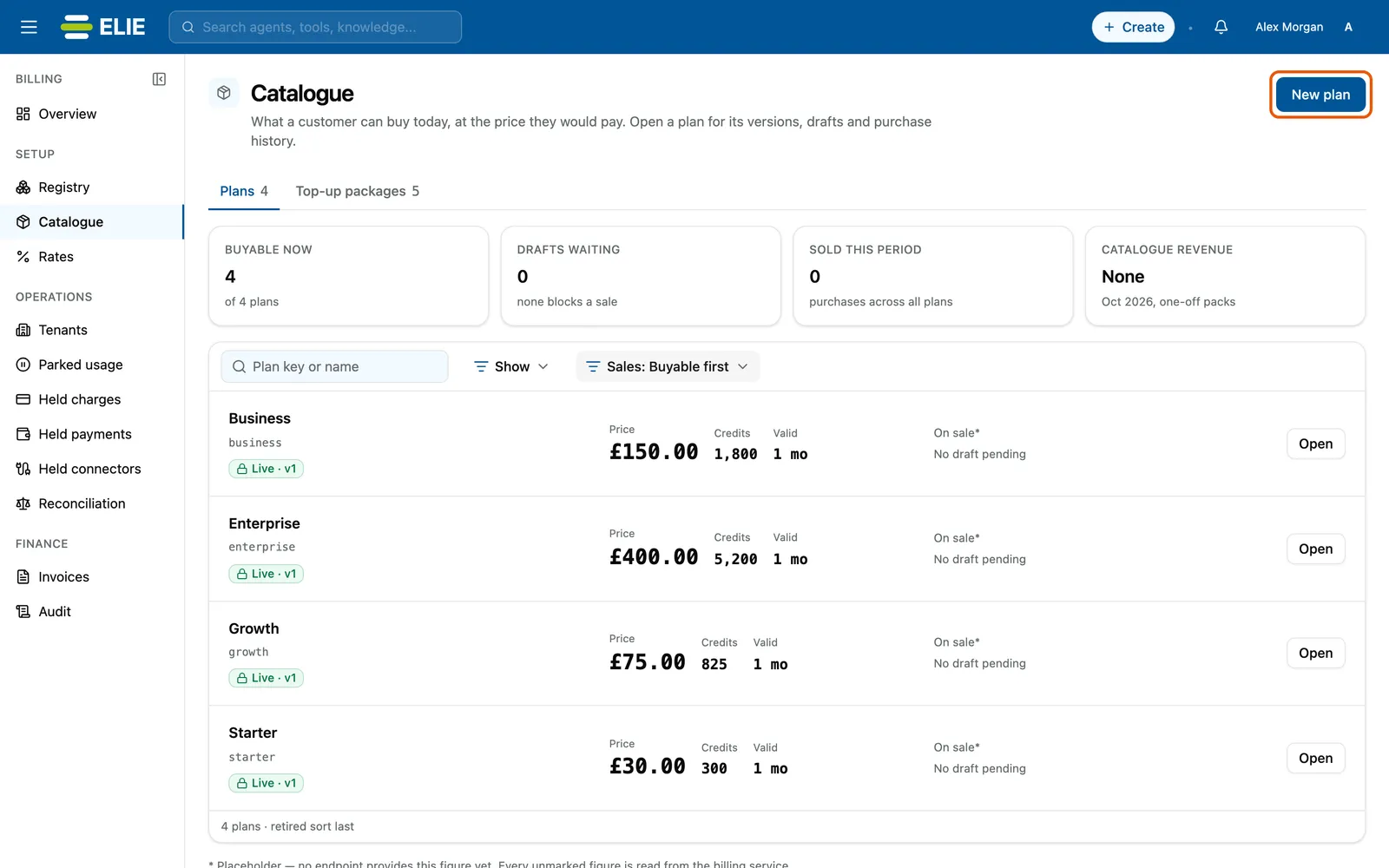
The Catalogue on its Plans tab, with New plan ringed at the top right: the Buyable now, Drafts waiting, Sold this period and Catalogue revenue figures, then Business, Enterprise, Growth and Starter, each Live at v1 with its price, credits and validity. EnlargeCreate the plan
Select New plan, enter a Plan key (lowercase snake_case; it never changes), a Display name and a Reason, then Create plan. The plan’s own page opens.
Add a draft version
Select New version. Enter the Display name customers see, an optional Description, the Price in pence (GBP), the Credits it grants, a Validity unit and Validity amount, and the Components this plan reaches. Add a reason and select Create draft version.
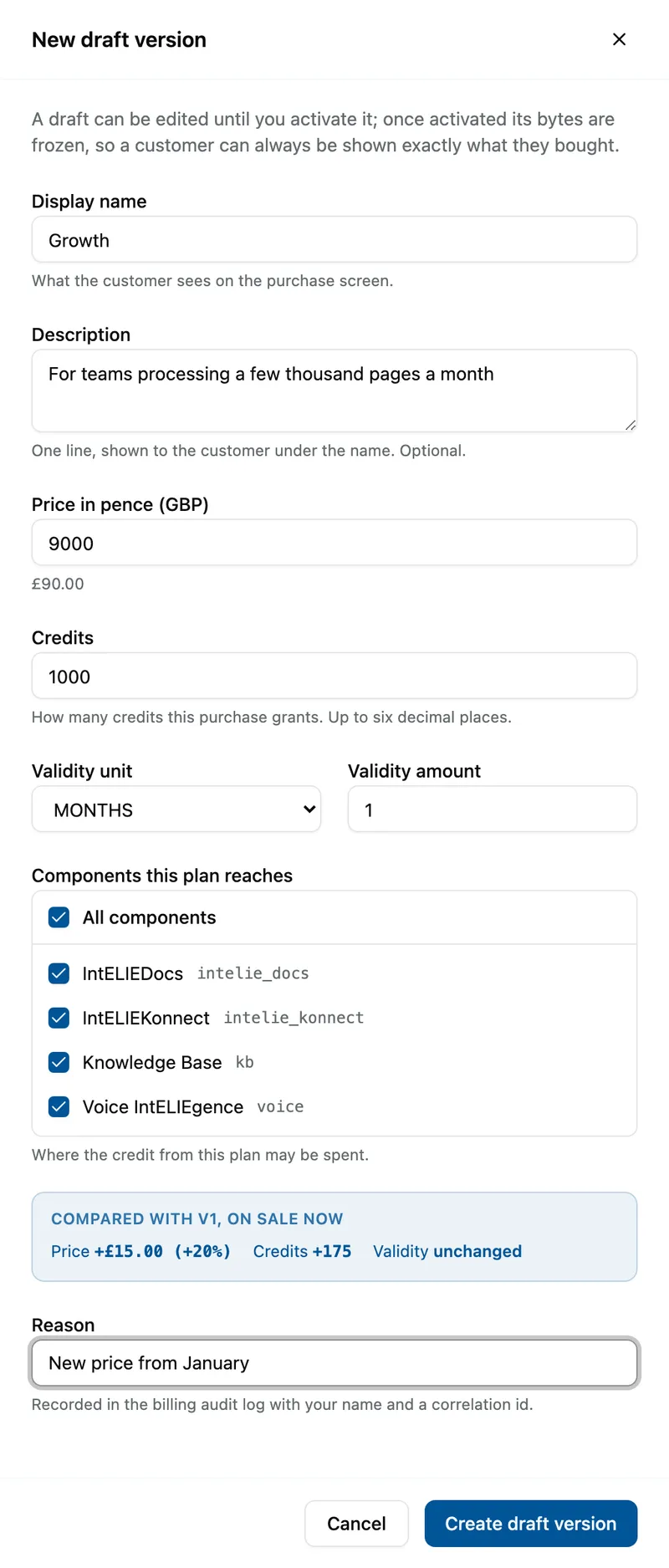
The New draft version drawer for the Growth plan: price 9000 pence shown as £90.00, 1000 credits, valid 1 month, all four components ticked, and the comparison with v1 reading Price +£15.00 (+20%) and Credits +175. Activate it
In Version history, select Activate v1 on the draft. In the drawer, check Version to activate and the comparison with what is on sale, give a reason and select Activate version.


What success looks like
- Plan version activated appears and the version reads ACTIVE · on sale.
- The plan's header reads On sale at the price, for the credits and validity you set.
- On the Catalogue list the plan shows Live · v1.
Changing what is on sale
To change a price, add a new version and activate it; the old version is kept as price history and past purchases keep their own terms. A draft can be edited with Edit draft until it is activated, and the drawer shows how it differs from the version on sale. Edit plan only renames. Retire plan takes a plan out of the catalogue for good after you type its key.
Top-up packages, on the Top-up packages tab, follow the same steps with New package and Create package. Their credit has no component list: it can be spent wherever the tenant's plan allows. A package can be taken out of the catalogue with Take off sale and brought back with Put on sale.
| Badge on the list | Meaning |
|---|---|
| Live · v2 | On sale at version 2. |
| Not buyable or No active version | Only a draft, or no version at all: nothing can be bought. |
| Retired or Off sale | Out of the catalogue; past purchases keep their credits. |
If something goes wrong
| Symptom | Likely cause | What to do |
|---|---|---|
| The price must be a whole number of pence above zero. | The price has decimals or is zero. | Enter pence: 3000 for £30. |
| Draft waiting reads blocked: with a reason. | The draft cannot be activated as it stands. | Edit the draft to fix what the reason names. |
| A plan shows Not buyable. | Its only version is still a draft. | Activate the draft. |
Next
- Publishing a price - what usage costs once credit is bought.
- Managing a tenant's billing account - granting credit without a sale.