Managing your chat conversations
Every question you ask is kept in a conversation, and the list down the left of the chat holds them all for that knowledge base. Nobody else can open your conversations, administrators included. The text of each question and of the reply, though not who asked, can be read in Retrieval trace by anyone with access to the knowledge base's analytics.
- The Knowledge Base app in your top bar.
- These permissions: Knowledge Base · Chat - List, Knowledge Base · Chat - Read, Knowledge Base · Chat - Execute, Knowledge Base · Chat - Delete.
- A knowledge base you have asked before. Pinning and renaming need Chat - Execute; deleting needs Chat - Delete.
If Knowledge Base isn't in your top bar, your role can't view it or your plan doesn't include it. Ask a workspace administrator, or see Permissions and module visibility.
Steps
Find the list
Open the knowledge base’s chat. Your conversations are listed on the left, titled from their first question, under Pinned and Recent; select a heading to fold it away. Scroll down to load older ones, or type in Search by name to find a title among all of them.
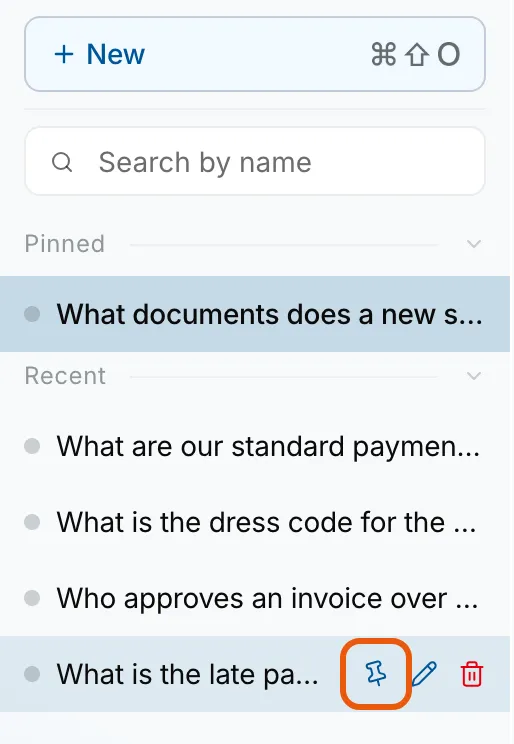
The conversation list under Pinned and Recent, five conversations titled from their first question, with the Pin chat, Rename chat and Delete buttons showing on What is the late payment fee?, Pin chat ringed. Go back to one
Select a conversation to reopen it with its answers and sources. The address bar now names it, so refreshing the page or bookmarking it brings you back to the same conversation.
Start another
Select New, or press Ctrl+Shift+O (Cmd+Shift+O on a Mac). An answer still being written in another conversation carries on, and its row shows a pulsing dot until it finishes.
Pin or rename one
Hover or focus the conversation. Pin chat moves it to Pinned, and Unpin chat moves it back. Rename chat (the pencil), or a double-click on the title, lets you type a new one: press Enter to keep it, or Esc to keep the old one.
Delete one
Select Delete (the bin) on the conversation, and confirm with Delete in the Delete conversation dialog.
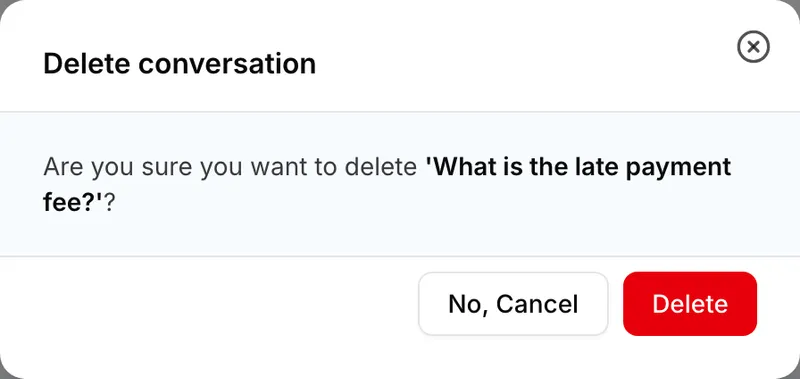
The Delete conversation dialog asking whether to delete What is the late payment fee?, with No, Cancel and Delete.


What success looks like
- The conversation you selected opens with every earlier answer and its Sources.
- A pinned conversation sits under Pinned, and a renamed one shows its new title straight away.
- Conversation deleted appears and the row leaves the list.
Sources you can no longer open
When you reopen a conversation, Elie checks your access again. A source you can no longer reach, because its document was removed or its access changed, shows as Source unavailable with a padlock. The answer text stays as it was; only the passage is withheld.
A question whose answer failed is kept too: the conversation is listed under that question and reopens with the question and an empty reply, so you can ask it again.
If something goes wrong
| Symptom | Likely cause | What to do |
|---|---|---|
| Could not open that conversation. | It was deleted, or it is someone else's conversation from a shared link. | Start a new one with New. |
| You do not have permission to do that. when you rename, or Could not delete that conversation. | Renaming needs Knowledge Base · Chat - Execute; deleting needs Knowledge Base · Chat - Delete. | Ask a workspace administrator. |
| There is no Pin chat or Rename chat on a row. | Your role lacks Knowledge Base · Chat - Execute, so the chat is read-only. | Ask a workspace administrator. |
| A conversation is missing from the list. | It belongs to another knowledge base, or to someone else, or a search is still typed. | Clear Search by name, or open that knowledge base's chat. Other people's conversations never appear. |
Next
- Asking a question and reading the answer - what happens inside a conversation.
- Rating an answer and reviewing feedback - your rating stays with the answer when you reopen it.
- Reading a retrieval trace - why an answer used what it used.