Verifying a connector
Verifying is Elie proving it can sign in. Engagement Status turns Connected only when it works, and Enable appears only after that. Which control you get depends on the sign-in method, not on the kind of system: an email connector can use either.
- The IntELIEKonnect app in your top bar.
- These permissions: IntELIEKonnect · Import - Update, IntELIEKonnect · Import - Execute.
- A connector with its required fields filled in. Export connectors work the same way with the Export permissions.
If IntELIEKonnect isn't in your top bar, your role can't view it or your plan doesn't include it. Ask a workspace administrator, or see Permissions and module visibility.
Test or Authenticate?
| Control | Used by | What happens |
|---|---|---|
| Test | SFTP, FTPS, Email with App Password or Graph API, Azure Blob Storage, Amazon S3, Webhook, and REST API with any method but OAuth 2.0 | Elie connects while you wait and says whether it worked. Nothing is saved. |
| Connect | SQL Database, MongoDB | The same test, which also lists the databases and tables for the fields below it. |
| Authenticate | Google Drive, Dropbox, Microsoft OneDrive, the accounting types, Email with Microsoft Sign-in, REST API with OAuth 2.0 | You sign in at the provider in a pop-up window. |
An Email export has nothing to verify: it sends through Elie's own sender and counts as connected once its settings are saved. For Test, Save Changes (or Continue setting up) runs the test again and records the result; see Configuring an import connector.
Signing in with Authenticate
Start the sign-in
On Configuration, fill in the required fields (for Microsoft Sign-in, the Mailbox), then select Authenticate. Elie saves the fields, Connector Status becomes Verification Pending, and the provider opens in a pop-up window.
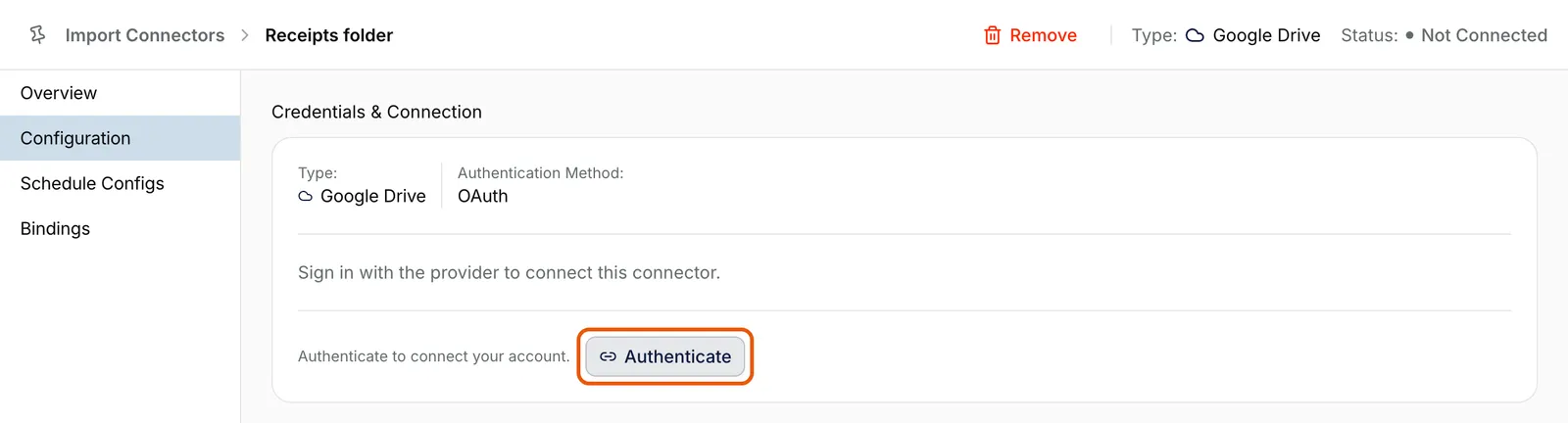
The Configuration tab of Receipts folder, a Google Drive import connector, in edit mode: Type Google Drive, Authentication Method OAuth, the line Sign in with the provider to connect this connector, and Authenticate ringed at the foot of the card. EnlargeSign in at the provider
Sign in with the account Elie should use and accept the permissions it asks for. For Microsoft Sign-in, that is the account that owns the mailbox. Authorization in progress counts down from three minutes above the tabs.
Finish on Elie
The window closes and _Authentication successful_ appears. Engagement Status reads Connected and the status returns to what it was, Initialised for a new connector. Choose the folder or organisation if the type asks for one, then save.

If the sign-in is refused, cancelled or takes longer than three minutes, the connector becomes Verification Failed and a message says why. Select Authenticate again. Once connected, the card reads Connected to your account. The next time you select Edit you can sign in again to switch accounts, except on the accounting types.
Sign in with your own account and the connector depends on your access; it stops working if you leave or change role. For anything long-lived, use an account your organisation keeps for integrations.
When a working connection stops
Elie switches a connector off when its sign-in starts failing, and Configuration opens with Action required. Select Reconnect for a provider sign-in, or Update credentials, then Re-test connection, for anything else. Engagement Status returns to Connected; select Enable to switch the connector back on.

If something goes wrong
| Symptom | Likely cause | What to do |
|---|---|---|
| Test fails with an authentication error. | Wrong password, or an account password where an app password is expected. | Correct it; an App Password connector needs an app password. |
| Test times out. | Host, port or a firewall. | Check the host and the port the field hint suggests. |
| Test says the mailbox server's certificate is not trusted. | The mail server's certificate is self-signed, expired or for another name. The password is not the problem. | Check IMAP Host is your provider's own server name, or ask your mail administrator. |
| Couldn't read the mailbox with the account you signed in with. | You signed in as someone other than the mailbox owner. | Select Authenticate and sign in as the owner. |
| This connector's sign-in isn't configured on this server yet. | Elie hasn't been registered with that provider. | Contact your administrator or support. |
| The provider shows a consent or approval error. | Your organisation restricts outside apps. | Ask your administrator to approve Elie, or use a Test sign-in method. |
Next
- Enabling, disabling and removing - the step verifying unlocks.
- Connector statuses explained - every status and its badge.
- Choosing a connector type - which methods each type offers.