Who can see a Smart Queue's originals
When a Smart Queue redacts a document, most people only ever see the redacted copy. Original Access names the people who may also open and download the original, including for documents the queue redacted before a later change to its routes.
- The IntELIEDocs app in your top bar.
- This permission: IntELIEDocs · SmartQueue - Update.
- A Smart Queue. To see an original, a person needs both a place in this scope and IntELIEDocs · Original document - View, granted in Access Control.
If IntELIEDocs isn't in your top bar, your role can't view it or your plan doesn't include it. Ask a workspace administrator, or see Permissions and module visibility.
Steps
Open the tab
Open the queue from the Smart Queue list and select Original Access in its tabs. Every Smart Queue has it, even one that does not redact today.
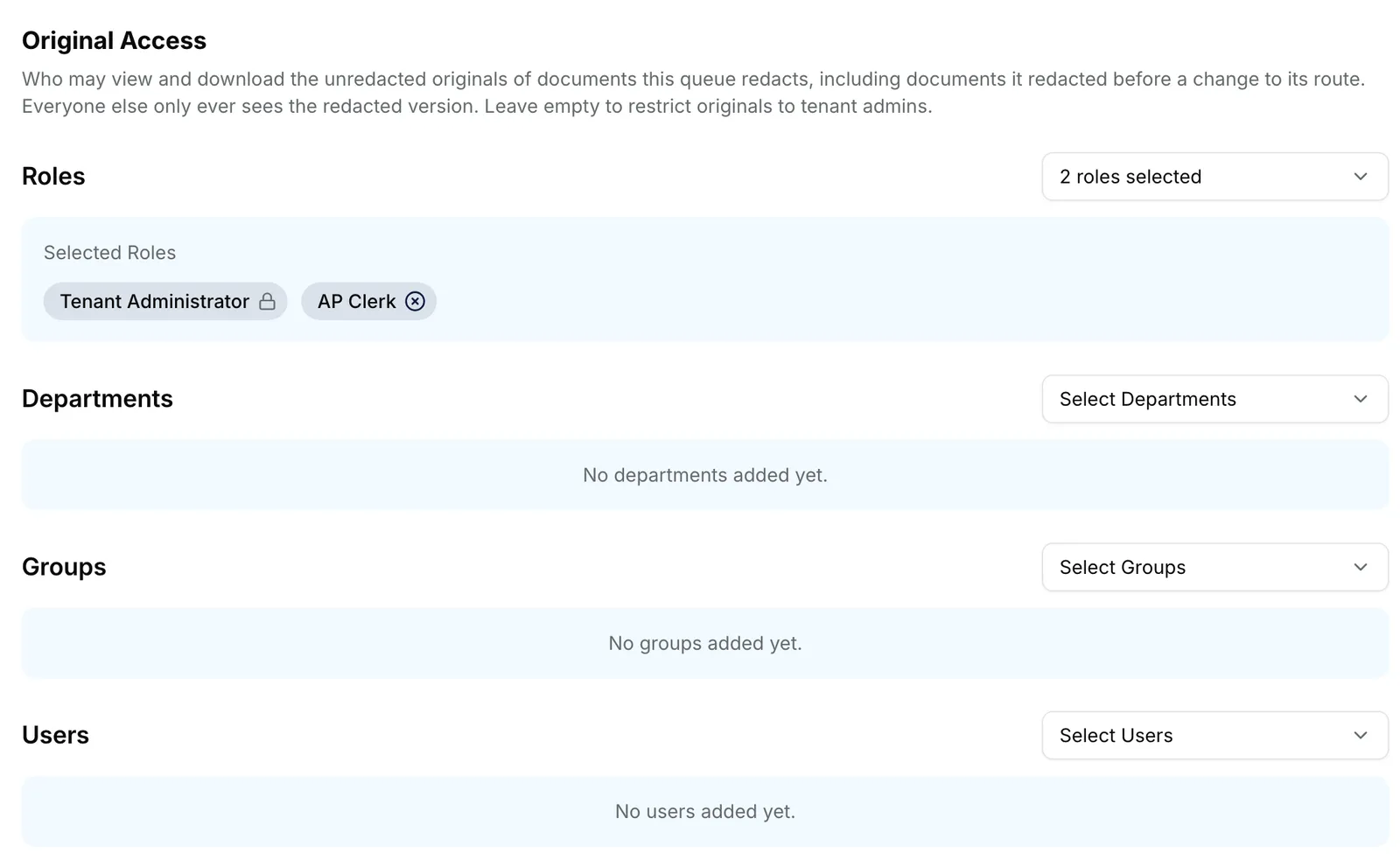
The Original Access tab of the Finance Inbox queue: an explanation under the heading, then the Roles, Departments, Groups and Users pickers, with AP Clerk added under Roles. EnlargeAdd who may see originals
Work through Roles, Departments, Groups and Users. Each pick is saved at once, and a message such as _Role added to Original Access_ confirms it.
Remove someone
Select the cross on a chip. A message such as _Role removed from Original Access_ confirms it.
Check the permission
In Access Control, make sure the roles of the people you added hold IntELIEDocs · Original document - View. See Roles.

What success looks like
- Each entry appears as a chip under its list.
- Someone in the scope who holds the permission sees Original and Download Original on the queue's redacted documents.
- Everyone else finds Original greyed out with a padlock.
An empty scope means tenant administrators only
Original Access has no Unrestricted switch, unlike Visibility Scope. Leave every list empty and only tenant administrators can open originals. Only one change saves at a time, so the pickers are disabled for a moment after each pick.
If something goes wrong
| Symptom | Likely cause | What to do |
|---|---|---|
| A message says Original Access was changed by someone else. | Another person saved a change first, so yours was not saved. | The latest saved lists are now shown. Make your change again. |
| Could not update Original Access | The change was refused, usually because your role lacks IntELIEDocs · SmartQueue - Update. | Ask an administrator. |
| Someone in the scope still sees a padlock on Original. | Their role lacks IntELIEDocs · Original document - View. | Grant it in Roles. |
| A colleague is missing from Users. | Users offers only people whose role can view Smart Queues. | Give them a role that can, then reopen the tab. |
Next
- Changing a Smart Queue's pipeline - which routes redact.
- Setting visibility scope - who can open the queue at all.
- Downloading and exporting - the redacted and original copies.